Mobile App design + Physical AI

Mobile App design + Physical AI

Thinkle: Learning that listens, responds, and grows with you.

Thinkle bridges physical and digital learning by combining smart glasses with an AI-powered platform. Rather than tracking performance alone, Thinkle helps learners recognize their study habits and emotional rhythms—turning raw data into meaningful self-awareness for continuous growth.

Thinkle bridges physical and digital learning by combining smart glasses with an AI-powered platform. Rather than tracking performance alone, Thinkle helps learners recognize their study habits and emotional rhythms—turning raw data into meaningful self-awareness for continuous growth.

Project Information

AI-powered educational service

Duration

Duration

Feb - May 2025

Role

Role

UI/UX Designer

Recognition

Recognition

Nominated for UX Design Awards 2025
Problem

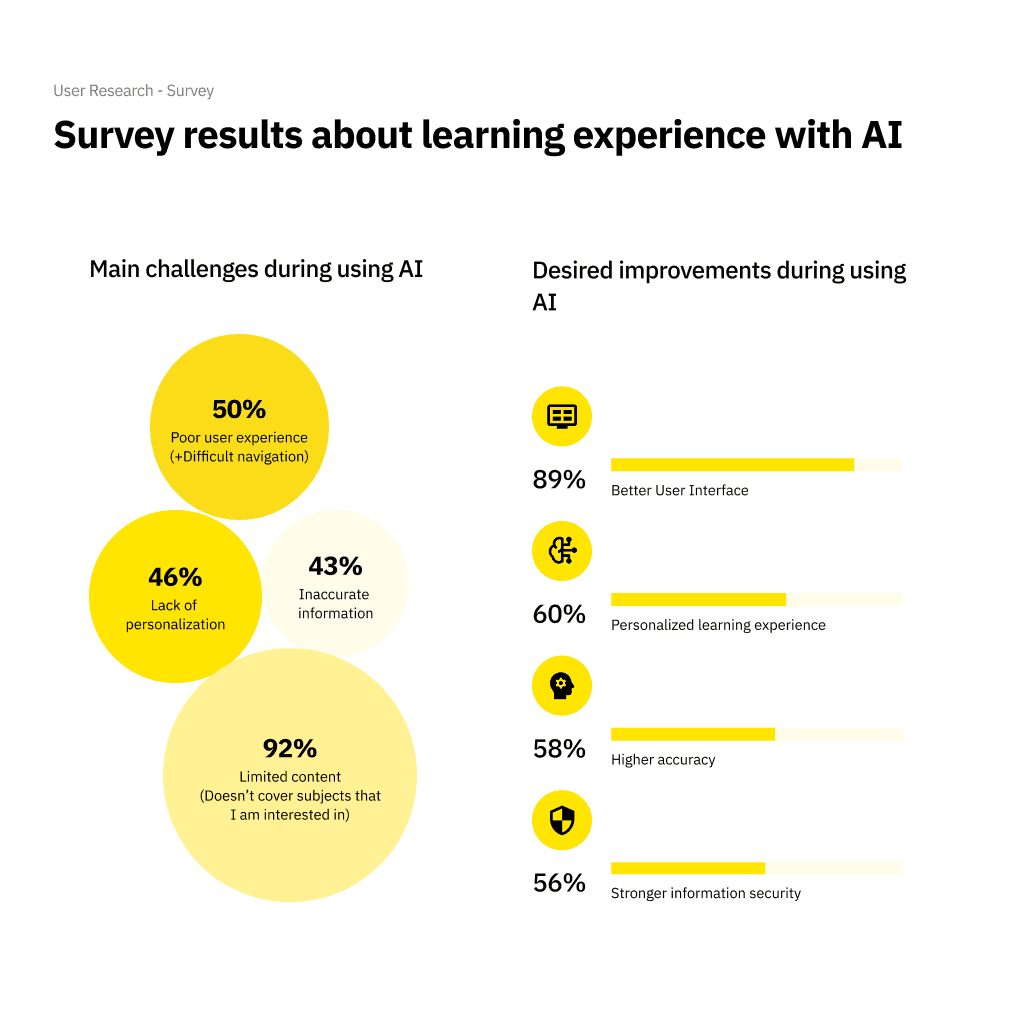
86% of students use AI for studying, but existing tools are failing them.

Current AI learning tools don't understand context, can't adapt to individual comprehension levels, and create more friction than support. Students are left feeling:

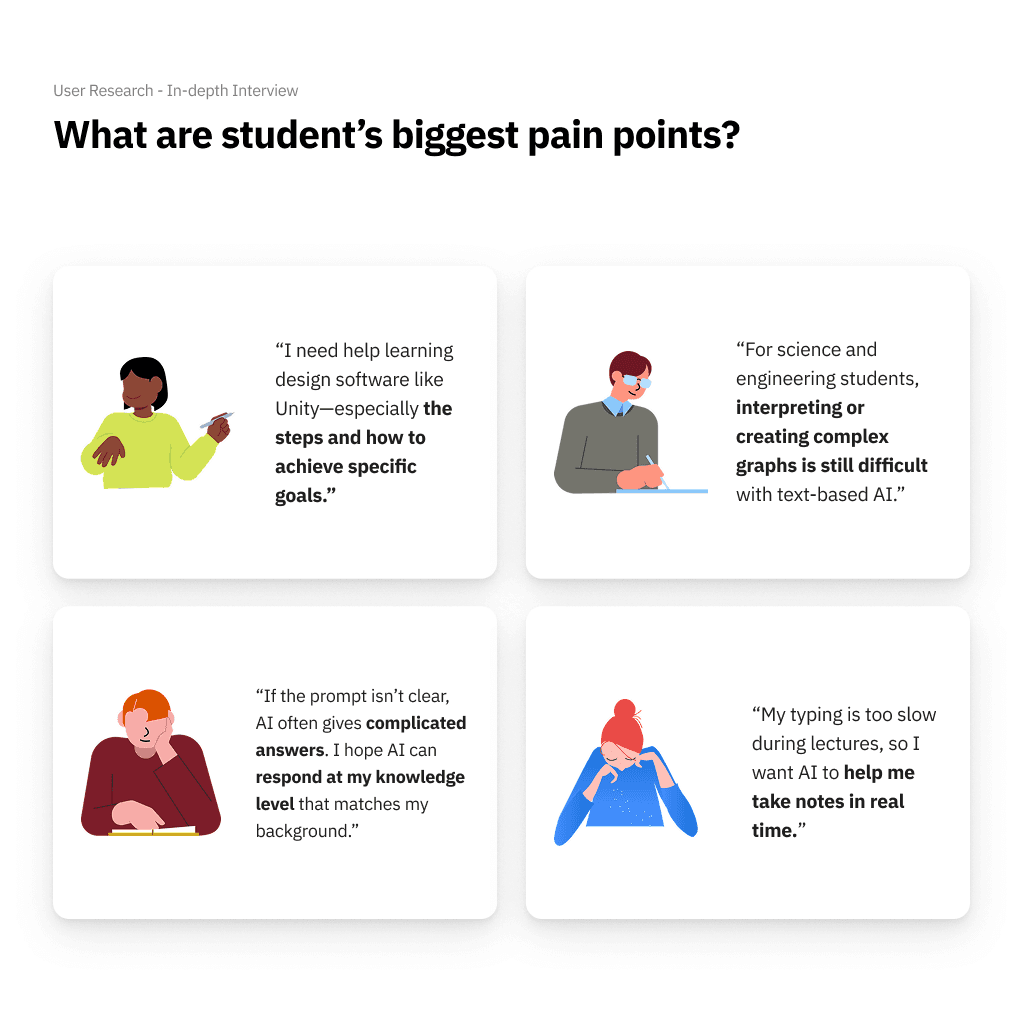
"I can't keep up. I can't understand. I am losing my confidence and my motivation to learn."

Challenge

How might we create a personalized learning experience that provides contextual support aligned with each student's individual comprehension level?

Solution

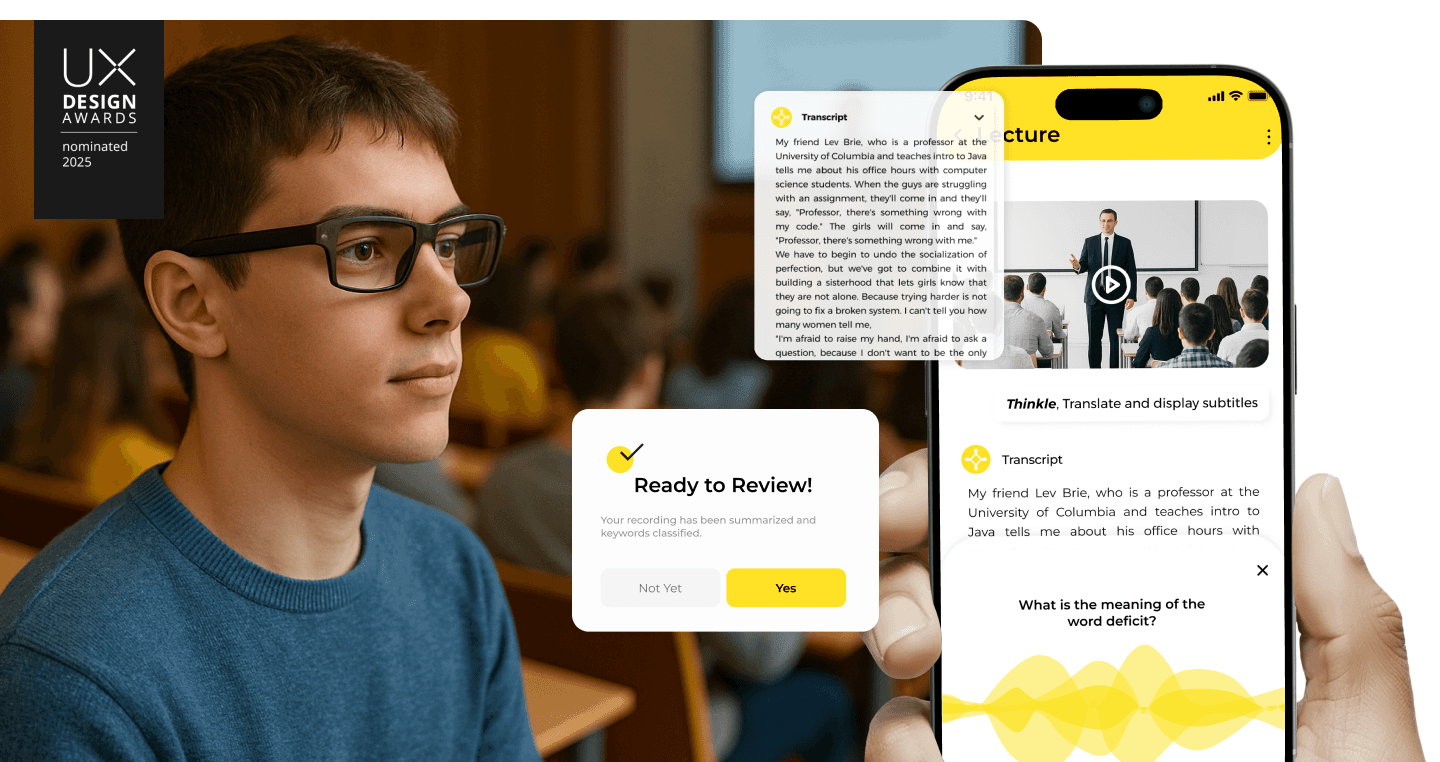
  1. Voice Capture & Summarization: Developed an AI-powered smart glasses system that records and summarizes lectures and spontaneous questions in real time.

  2. Weakness Detection & Review: Integrated a personal learning analyzer that tracks user questions to identify gaps and recommends targeted reviews.

  3. Community Interaction: Enabled learners to share study logs and questions in a blog-style community, fostering peer-to-peer support and knowledge exchange.

  4. Voice-to-Text Note-taking: Designed seamless voice transcription features to help users focus during lectures without missing key information.

Research

Understanding the problem

The Critical Insight

Students using poorly designed AI tools reported:

  • Lost confidence in their abilities

  • Decreased motivation to learn

  • Feeling further behind their peers

This isn't just a usability problem—it's affecting students' academic success and mental health.

  • Lost confidence in their abilities

  • Decreased motivation to learn

  • Feeling further behind their peers

This isn't just a usability problem—it's affecting students' academic success and mental health.

Market Validation

The opportunity is real and growing:

The opportunity is real and growing:

  • 86% of students already use AI in their studies

  • 54% use it weekly, 24% daily

  • AI in Education market growing from $1B (2020) → $6B (2025)

  • 86% of students already use AI in their studies

  • 54% use it weekly, 24% daily

  • AI in Education market growing from $1B (2020) → $6B (2025)

But there's a critical gap: 65% of people are visual learners, yet most AI tools are built for text-based interaction only.

But there's a critical gap: 65% of people are visual learners, yet most AI tools are built for text-based interaction only.

Defining the Solution Space

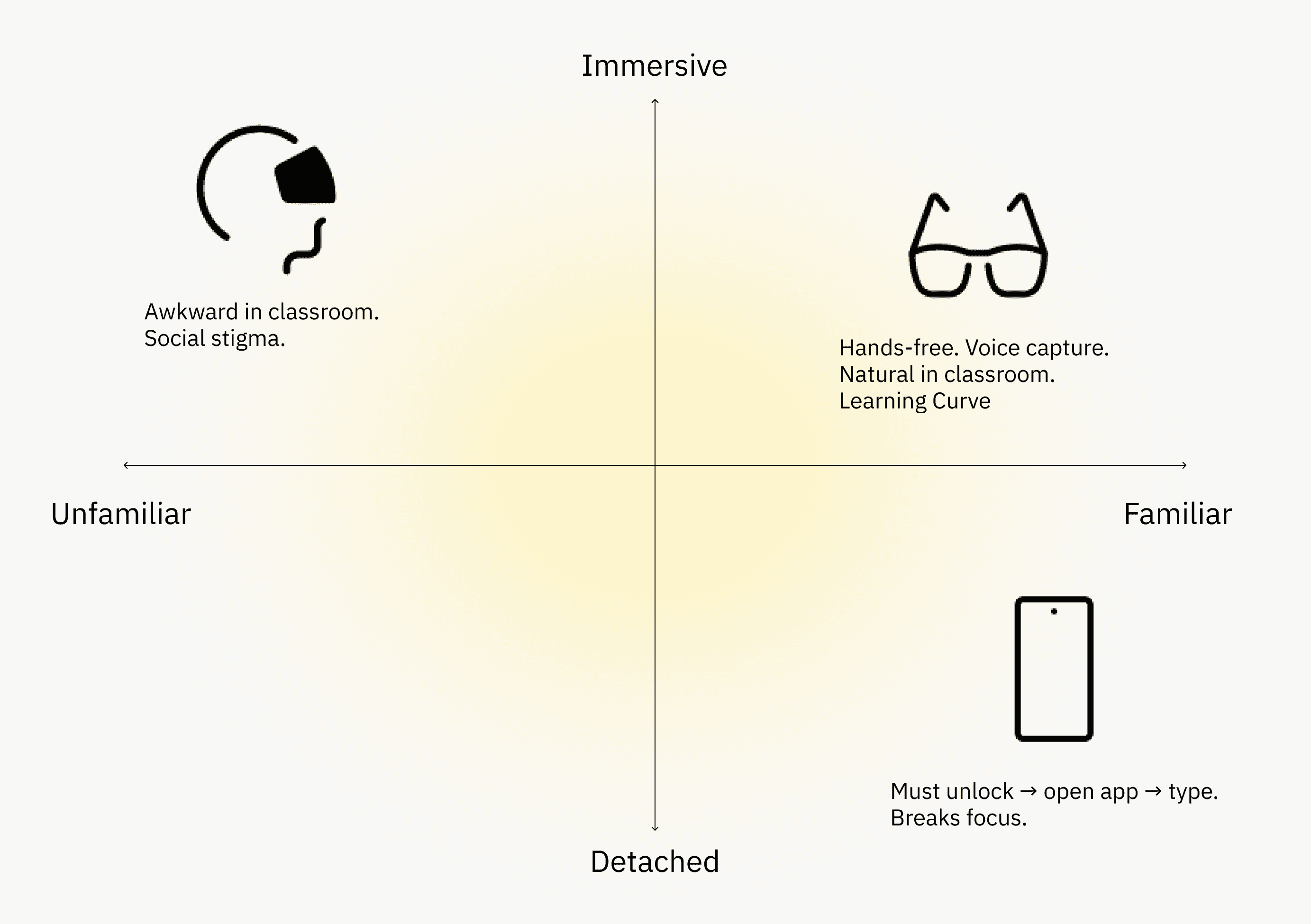
Why Smart AI Glasses?

I evaluated multiple platforms to find the best solution for seamless, real-time learning support.

Key Insight

Through Smart glasses function as a sensor hub—capturing audio, visuals, and context without interrupting the learning flow. This creates a seamless bridge between physical learning and AI support. mapping, I identified a complex ecosystem involving 9 distinct stages with 10 information exchanges—the majority representing redundant data transfers.

Design Iteration

The Core UX Challenge

Problem: Students couldn't connect concepts across different lectures.
"I can't see how concepts connect to each other. It's hard to find related content from different lectures."

Initial Design

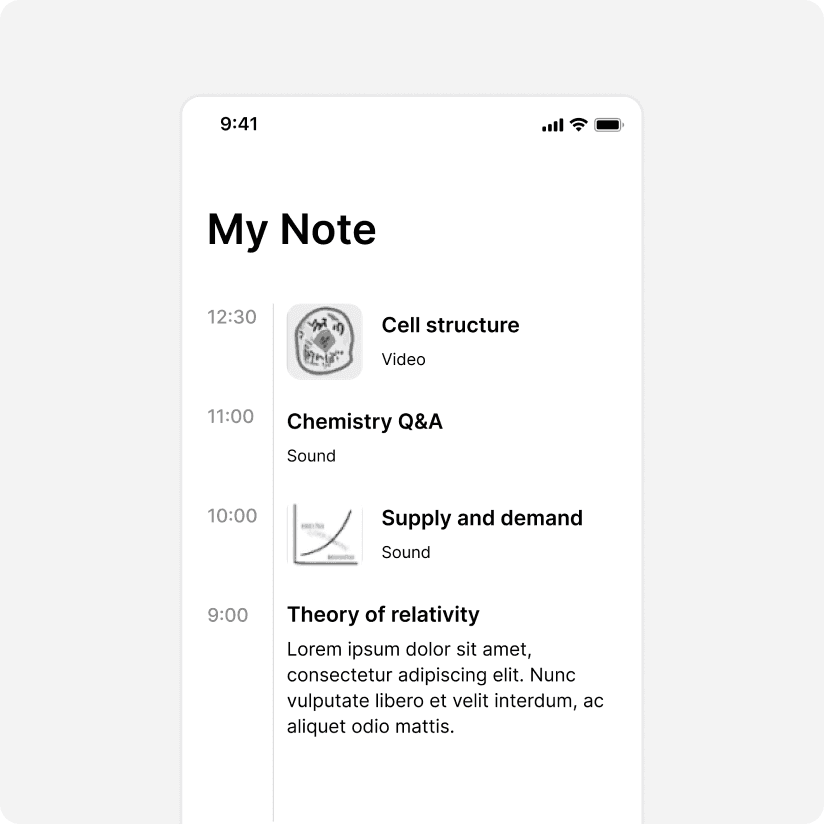
Chronological Timeline (Initial Design)

Hypothesis:

Organizing notes by time helps students recall when they learned something.

My Approach:

  • Timeline-based feed showing all notes in order

  • Simple, familiar pattern from social media

User Testing Results:

  • "I don't care when I learned about derivatives—I need to see all my calculus concepts together."

  • Difficult to connect related concepts from different weeks

  • Required excessive scrolling to find information

Learnings

Students don't think in chronological terms—they think in conceptual clusters.

Design Iterations

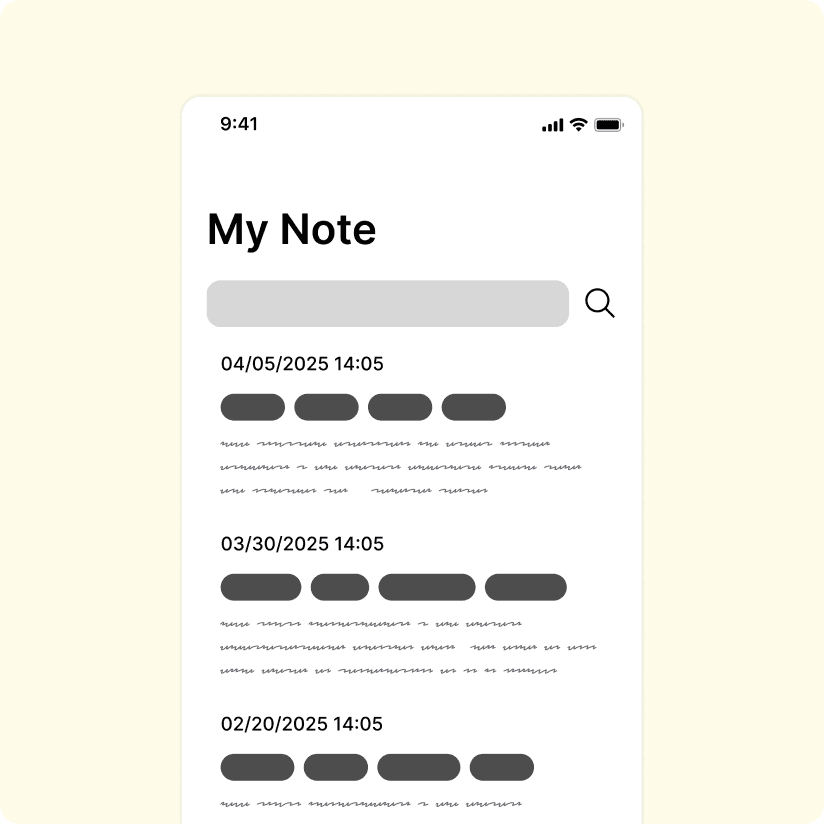
  1. Keyword Tagging System (Selected)

Hypothesis:

Flexible, user-created tags mirror how students naturally think about concepts.

Why this system:

"I need to see all calculus concepts together"

-> Search/filter by "calculus" tag shows all related notes

"I want to connect derivatives to graphs"

-> One note can have multiple tags

"I organize differently than my classmates"

-> Users create their own tags based on their mental models

"I need quick access during study sessions"

->Tap any tag to see all related content instantly

"I need to see all calculus concepts together"

-> Search/filter by "calculus" tag shows all related notes

"I want to connect derivatives to graphs"

-> One note can have multiple tags

"I organize differently than my classmates"

-> Users create their own tags based on their mental models

"I need quick access during study sessions"

->Tap any tag to see all related content instantly

User Testing Results:

  • ✓ 94% of test users could find specific content within 10 seconds

  • ✓ "This is exactly how I think about my notes"

  • ✓ Reduced cognitive load by letting users browse by concept, not timeline

  • ✓ 94% of test users could find specific content within 10 seconds

  • ✓ "This is exactly how I think about my notes"

  • ✓ Reduced cognitive load by letting users browse by concept, not timeline

Key Features

Key Features

  1. Unlimited tags - No artificial limits on organization

  2. Multi-tagging - Connect concepts across subjects

  3. Search by keyword - Find content by concept, not time

  4. User-created taxonomy - Students define their own structure

  1. Unlimited tags - No artificial limits on organization

  2. Multi-tagging - Connect concepts across subjects

  3. Search by keyword - Find content by concept, not time

  4. User-created taxonomy - Students define their own structure

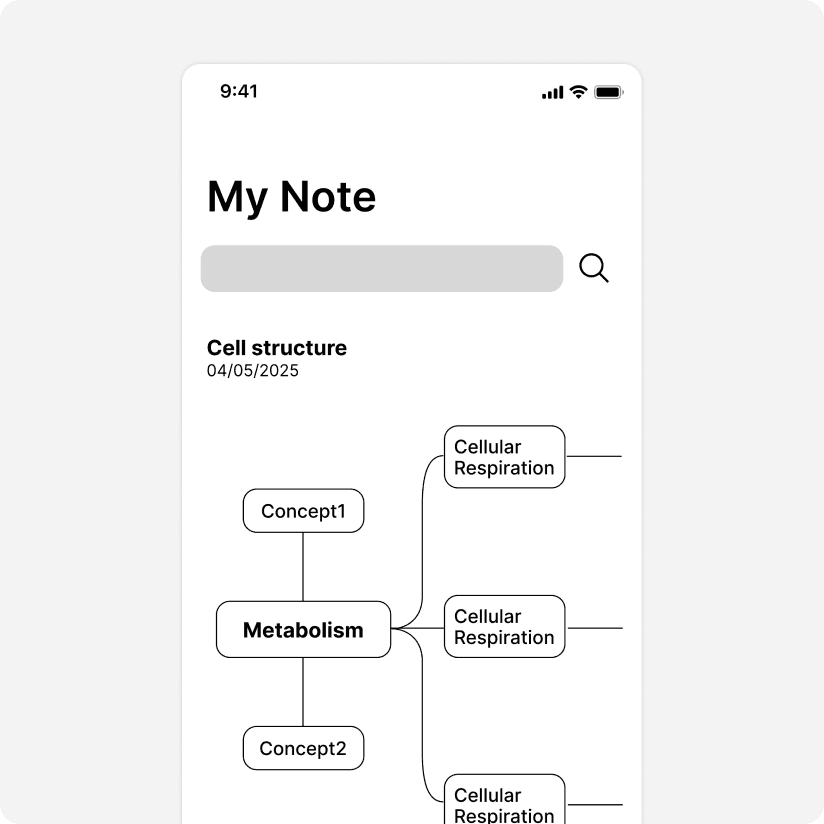
  1. Mind Mapping System

Hypothesis:

Visual connections between concepts mirror how the brain actually learns.

Visual connections between concepts mirror how the brain actually learns.

My Approach:

  • Interactive mind map showing concept relationships

  • Drag-and-drop connections between related topics

  • Visual hierarchy of parent/child concepts

  • Interactive mind map showing concept relationships

  • Drag-and-drop connections between related topics

  • Visual hierarchy of parent/child concepts

User Testing Results:

  • ❌ "This is impossible to use on my phone"

  • ❌ Every new connection required restructuring the entire map

  • ❌ Overwhelming for students with 10+ weeks of content

  • ❌ "This is impossible to use on my phone"

  • ❌ Every new connection required restructuring the entire map

  • ❌ Overwhelming for students with 10+ weeks of content

Learnings

Beautiful on desktop ≠ usable on mobile.

Students need their notes accessible anywhere.

Beautiful on desktop ≠ usable on mobile.

Students need their notes accessible anywhere.

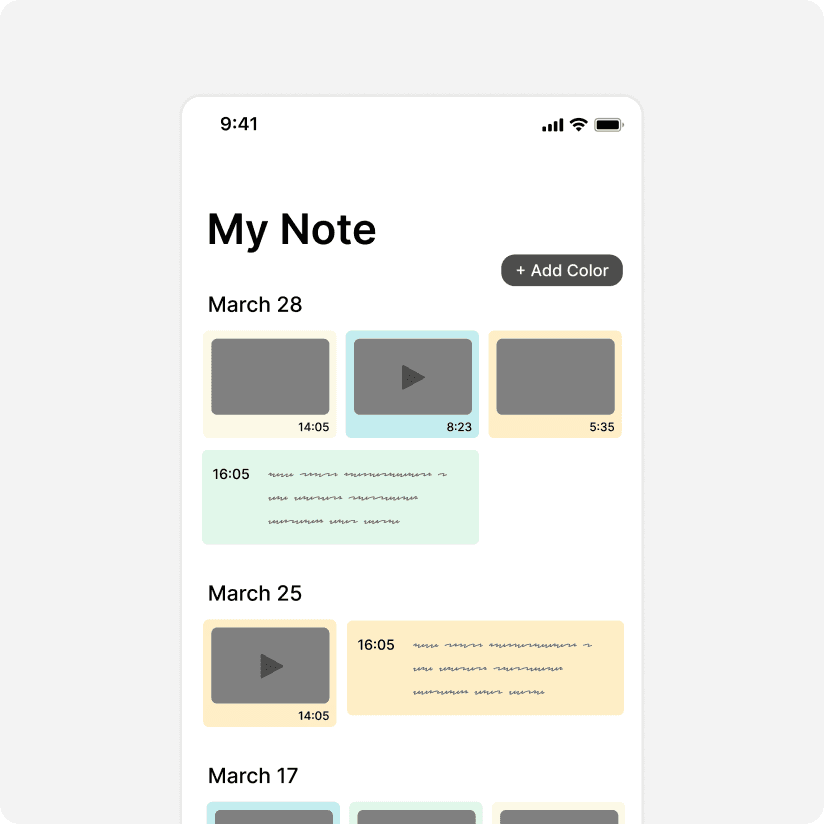
  1. Color Tagging System

Hypothesis:

Color-coding subjects makes information easier to scan visually.

Color-coding subjects makes information easier to scan visually.

My Approach:

  • Color-coded cards for different subjects

  • Chronological feed with color differentiation

  • Swipe gestures to filter by color

  • Color-coded cards for different subjects

  • Chronological feed with color differentiation

  • Swipe gestures to filter by color

User Testing Results:

  • ✓ Visually appealing and easy to understand

  • ❌ Limited to pre-set categories (couldn't create custom tags)

  • ❌ Didn't solve the core problem of connecting concepts

  • ✓ Visually appealing and easy to understand

  • ❌ Limited to pre-set categories (couldn't create custom tags)

  • ❌ Didn't solve the core problem of connecting concepts

Learnings

Color helps with visual scanning but doesn't replace flexible organization.

Color helps with visual scanning but doesn't replace flexible organization.

System Design

System Blueprint

The Challenge: How do we create a seamless flow between smart glasses (data capture) and mobile app (data interaction)?

The Challenge: How do we create a seamless flow between smart glasses (data capture) and mobile app (data interaction)?

I mapped the complete user journey to identify friction points and design solutions:

  1. Capture (Smart Glasses) → 2. Process (Cloud AI) → 3. Organize (Mobile App) → 4. Learn (AI Tutor) → 5. Review (Spaced Repetition)


I mapped the complete user journey to identify friction points and design solutions:

  1. Capture (Smart Glasses) → 2. Process (Cloud AI) → 3. Organize (Mobile App) → 4. Learn (AI Tutor) → 5. Review (Spaced Repetition)


I mapped the complete user journey to identify friction points and design solutions:

  1. Capture (Smart Glasses) → 2. Process (Cloud AI) → 3. Organize (Mobile App)

    → 4. Learn (AI Tutor) → 5. Review (Spaced Repetition)


Key Technical Decisions

Design Decision: Why Real-Time Sync Matters
Students often start a question on their glasses during lecture, then continue reviewing on their phone later. If the data isn't synced seamlessly, they lose their train of thought—and their learning momentum.

Design Decision: Why Real-Time Sync Matters
Students often start a question on their glasses during lecture, then continue reviewing on their phone later. If the data isn't synced seamlessly, they lose their train of thought—and their learning momentum.

Final Design

Key Design Decisions

1. Keyword Tagging Over Timeline

Why:

Why:

Students need to connect concepts across lectures, not just recall when they learned them.

Tags enable flexible, multi-dimensional organization.

Students need to connect concepts across lectures, not just recall when they learned them.

Tags enable flexible, multi-dimensional organization.

Impact:

Impact:

Reduces search time and improves concept retention by showing relationships.

Reduces search time and improves concept retention by showing relationships.

  1. Layered Information Architecture

Why:

Why:

Cognitive overload is a major barrier.

Collapsible sections let students control information density.

Cognitive overload is a major barrier.

Collapsible sections let students control information density.

Impact:

Impact:

Users can scan quickly or dive deep based on their current needs.

Users can scan quickly or dive deep based on their current needs.

  1. Context-Aware AI Tutor

Why:

Why:

Generic AI responses don't match student comprehension levels.

Our AI adapts based on learning patterns and preferences.

Generic AI responses don't match student comprehension levels.

Our AI adapts based on learning patterns and preferences.

Impact:

Impact:

Visual learners benefit from diagrams, beginners require foundational explanations, and advanced students receive in-depth analysis.

Visual learners benefit from diagrams, beginners require foundational explanations, and advanced students receive in-depth analysis.

Key Features

01 | My Note: Intelligent Organization

Problem: Students were overwhelmed managing notes from 5+ subjects across 15 weeks of lectures.

Problem: Students were overwhelmed managing notes from 5+ subjects across 15 weeks of lectures.

Solution: Keyword-based organization with AI-powered auto-tagging and visual hierarchy.

Solution: Keyword-based organization with AI-powered auto-tagging and visual hierarchy.

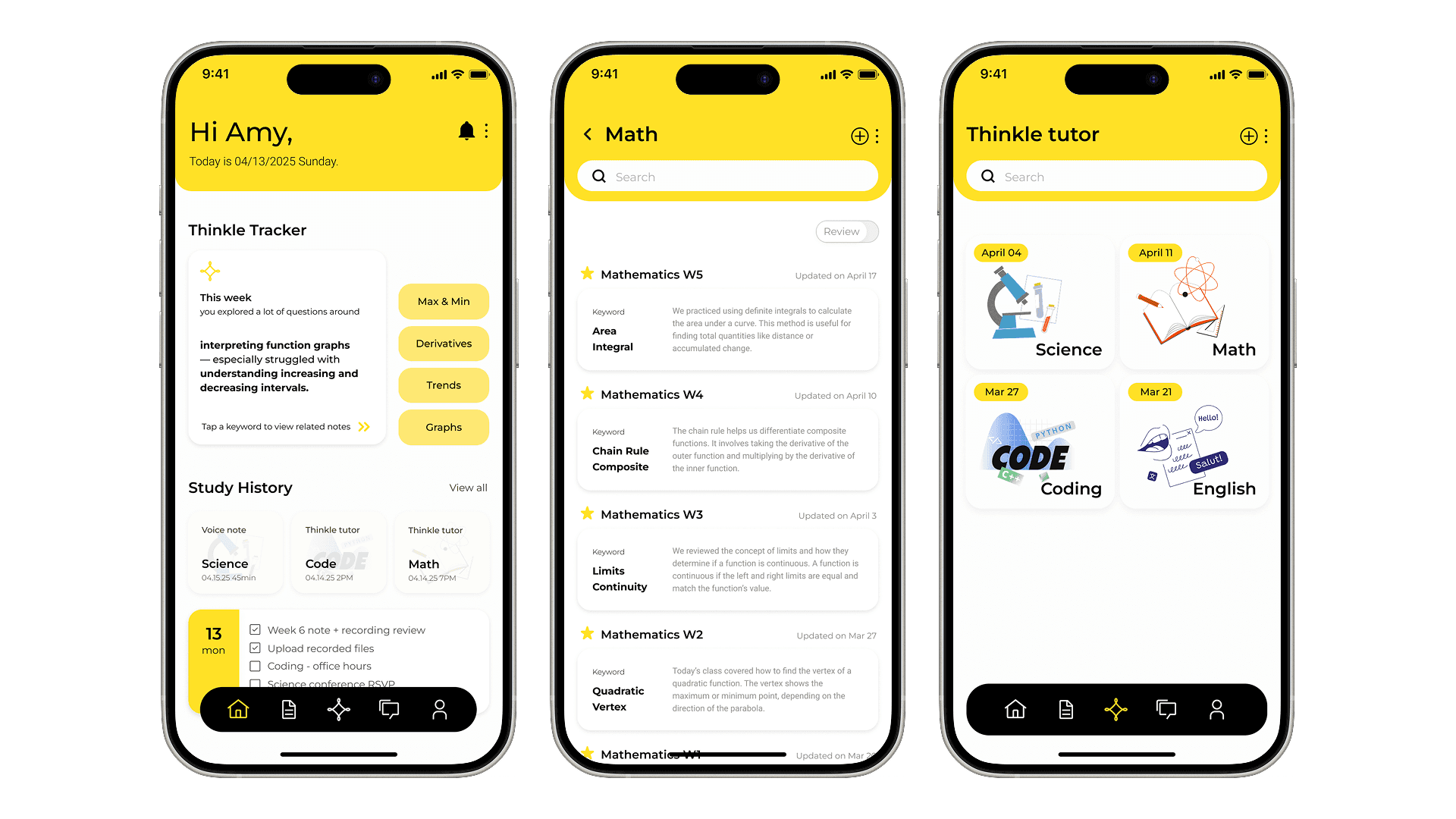
Home Dashboard: Check their learning patterns and get contextual recommendations based on what they're struggling with.

  • Thinkle Tracker: "This week you explored a lot of questions around interpreting function graphs—especially struggled with understanding increasing and decreasing intervals."

  • Quick Access: Tap suggested keywords (Max & Min, Derivatives, Trends, Graphs) to jump to related notes

  • Study History: Voice notes, Thinkle tutor sessions, and lecture recordings organized by recency

Home Dashboard: Check their learning patterns and get contextual recommendations based on what they're struggling with.

  • Thinkle Tracker: "This week you explored a lot of questions around interpreting function graphs—especially struggled with understanding increasing and decreasing intervals."

  • Quick Access: Tap suggested keywords (Max & Min, Derivatives, Trends, Graphs) to jump to related notes

  • Study History: Voice notes, Thinkle tutor sessions, and lecture recordings organized by recency

Subject Notebooks: Reduces cognitive load by organizing at the subject level, while still allowing keyword search across all notes.

  • Visual organization: Math, Code, English notebooks with custom icons

  • Recent Notes section shows cross-subject connections

  • Preview cards let you scan content without opening

Subject Notebooks: Reduces cognitive load by organizing at the subject level, while still allowing keyword search across all notes.

  • Visual organization: Math, Code, English notebooks with custom icons

  • Recent Notes section shows cross-subject connections

  • Preview cards let you scan content without opening

02 | Thinkle Tutor: Adaptive AI Support
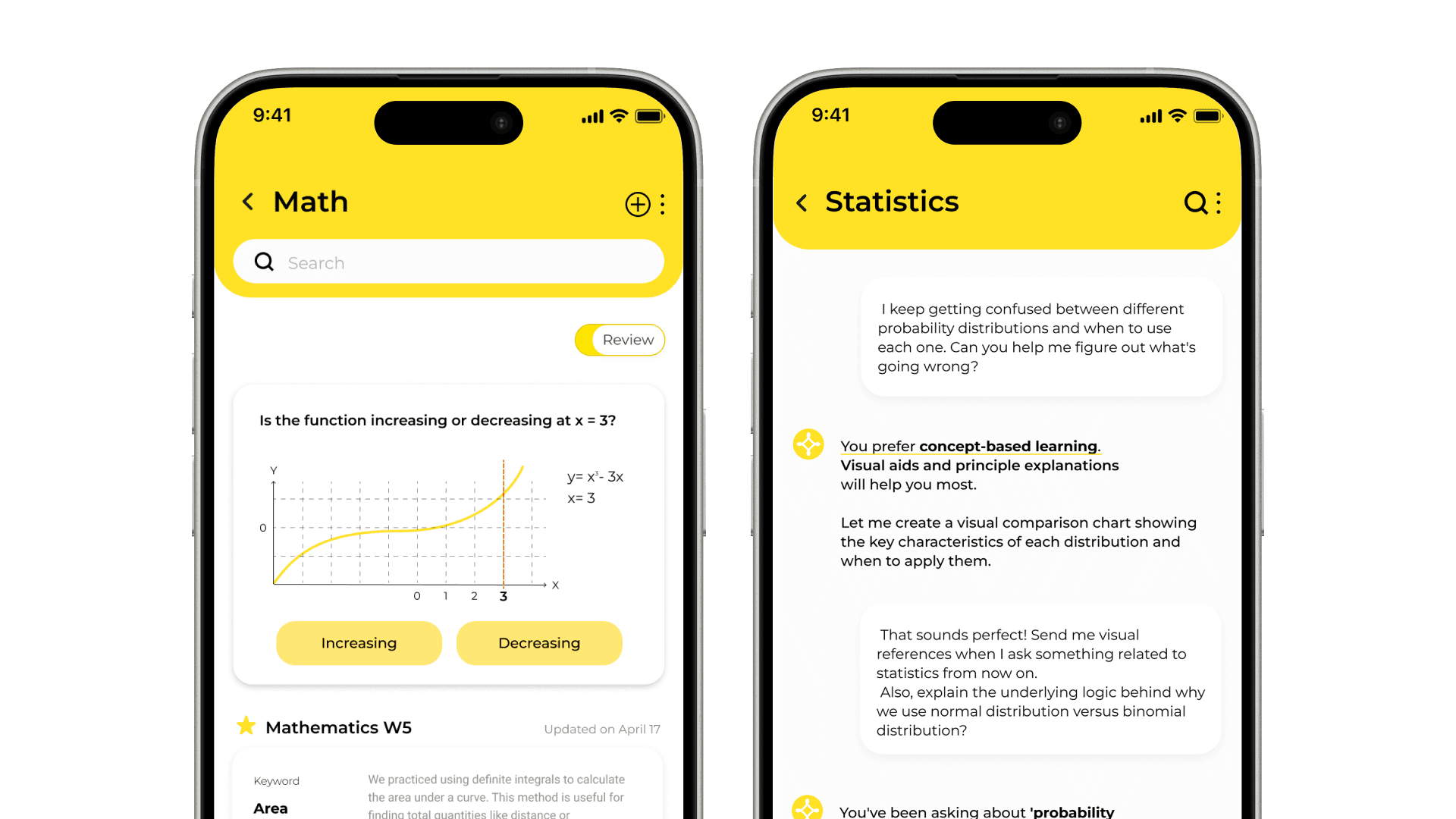
Problem: AI responses don't match student comprehension levels—beginners get overwhelmed, advanced students get bored.

Problem: AI responses don't match student comprehension levels—beginners get overwhelmed, advanced students get bored.

Solution: Context-aware AI that adapts to each student's knowledge level and learning style.

Solution: Context-aware AI that adapts to each student's knowledge level and learning style.

Reflection & Learnings

What I Learned

1. Beautiful ≠ Usable

The mind mapping system looked gorgeous in my designs but completely failed on mobile. -> Always test on the actual device students will use, not just desktop prototypes.


2. Context Is Everything for AI

The same question ("Explain derivatives") needs different answers for a struggling freshman vs. an advanced junior.


3. Design Systems Thinking for Multi-Device Experiences

Thinkle required seamless handoff between glasses and phone. This taught me to think in user flows, not just screens.

1. Beautiful ≠ Usable

The mind mapping xa looked gorgeous in my designs but completely failed on mobile. -> Always test on the actual device students will use, not just desktop prototypes.


2. Context Is Everything for AI

The same question ("Explain derivatives") needs different answers for a struggling freshman vs. an advanced junior.


3. Design Systems Thinking for Multi-Device Experiences

Thinkle required seamless handoff between glasses and phone. This taught me to think in user flows, not just screens.

Framework I developed:

Framework I developed:

  1. Map every device transition point

  2. Identify where data needs to sync

  3. Design loading states that maintain context

  4. Test the transitions, not just individual screens

  1. Map every device transition point

  2. Identify where data needs to sync

  3. Design loading states that maintain context

  4. Test the transitions, not just individual screens

Closing thoughts

Thinkle started with a simple observation: students aren't struggling because they're not smart enough—they're struggling because the tools don't adapt to them.
By combining smart glasses for friction-free capture, keyword-based organization that mirrors human thinking, and AI that actually understands context, we created a learning companion that students want to use.
This project taught me that great product design isn't about adding more features. It's about deeply understanding your users and removing every barrier between them and their goals.

Thinkle started with a simple observation: students aren't struggling because they're not smart enough—they're struggling because the tools don't adapt to them.
By combining smart glasses for friction-free capture, keyword-based organization that mirrors human thinking, and AI that actually understands context, we created a learning companion that students want to use.
This project taught me that great product design isn't about adding more features. It's about deeply understanding your users and removing every barrier between them and their goals.