EvalNow / Healthcare UX + Clinical Feedback Platform
Reimagining clinical feedback for dental education.
EvalNow is a clinical feedback platform redesigned to support dental students and faculty in delivering timely, constructive, and competency-based evaluations. Starting from an early prototype that failed to fit clinical realities, we conducted extensive research and redesigned the system from the ground up.
Role
Product Designer
Duration
Sep – Dec 2025
Skills
Market Research
User Research
Service Design
Information Architecture
UX/UI
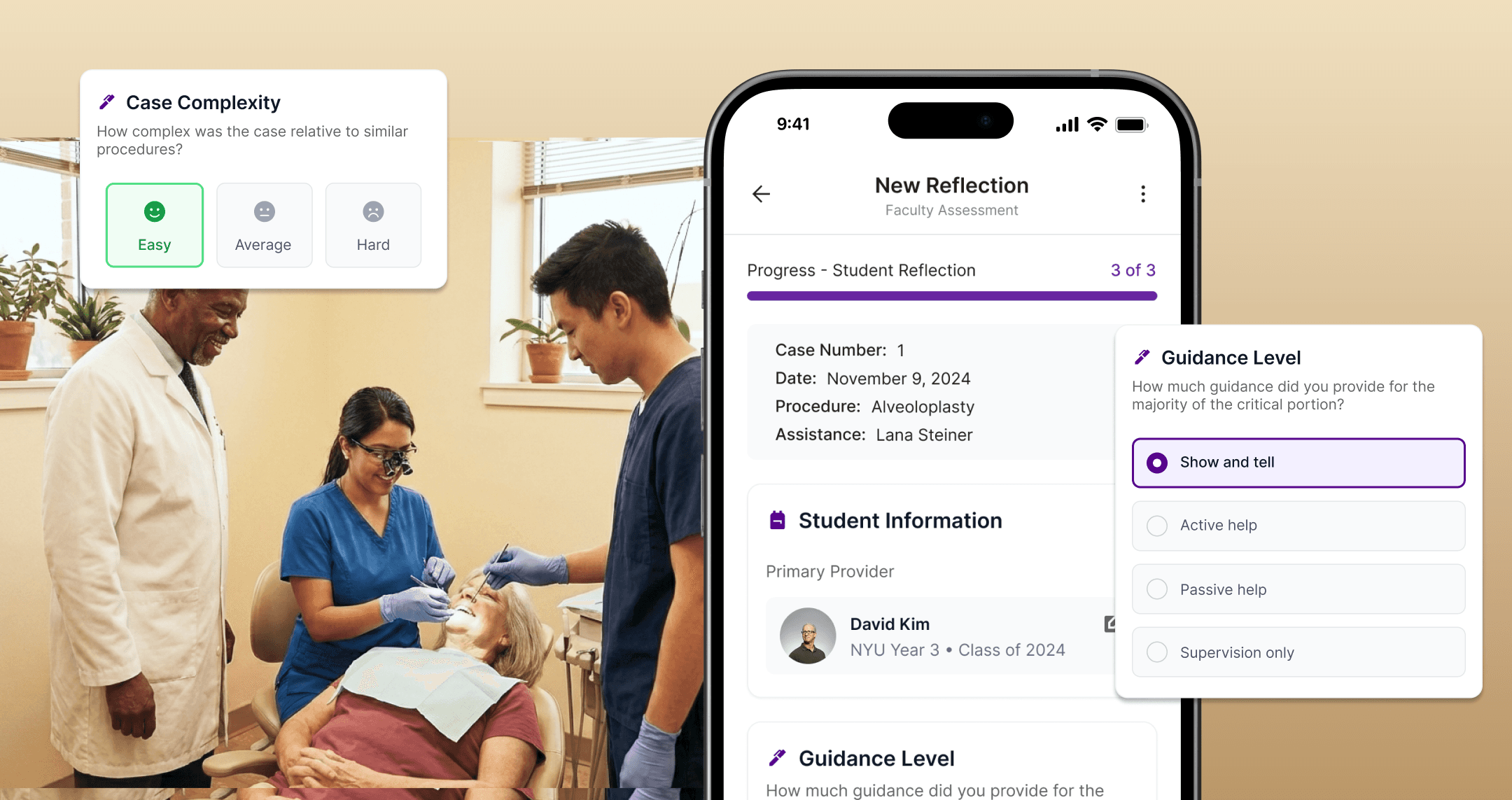
MY ROLE & CONTRIBUTIONS
Faculty-side interface
Designed Dashboard, New Reflection flow, Quick Actions, and AI Feedback Scaffolding
UX/UI Design
Led interaction design decisions for competency sliders, voice input, and tone guidance
User interviews
Conducted and synthesized 3 of 6 student interviews
Competitive analysis
Evaluated 6 clinical feedback platforms (MedHub, One45, LiftUpp, F3App, etc.)
Prototyping
Built interactive Figma prototype for usability testing
Overview
What if clinical feedback could actually support growth?
We redesigned EvalNow with NYU Dentistry, rebuilding a low-adoption clinical feedback tool into a mobile-first, reflective learning system.
PROJECT CONTEXT
Starting Point
Early prototype existed but was rarely used—too slow, desktop-only, no student view
Our Mandate
Redesign the system based on real user research, not assumptions
Scope
Faculty-side interface (primary), Student-side concepts (secondary)
Constraints
HIPAA compliance, integration with Axium/Brightspace, busy clinical environment
The problem
Feedback in dental education is broken and the original prototype didn't fix it.
Inconsistent, rushed, emotionally charged, and scattered across systems.
Clinical feedback at NYU Dentistry relies heavily on informal hallway conversations. Faculty juggle multiple students and patients simultaneously, leaving no time for thoughtful documentation. Students receive feedback verbally—then forget it by the next session. The existing prototype added digital overhead without solving the core problems.
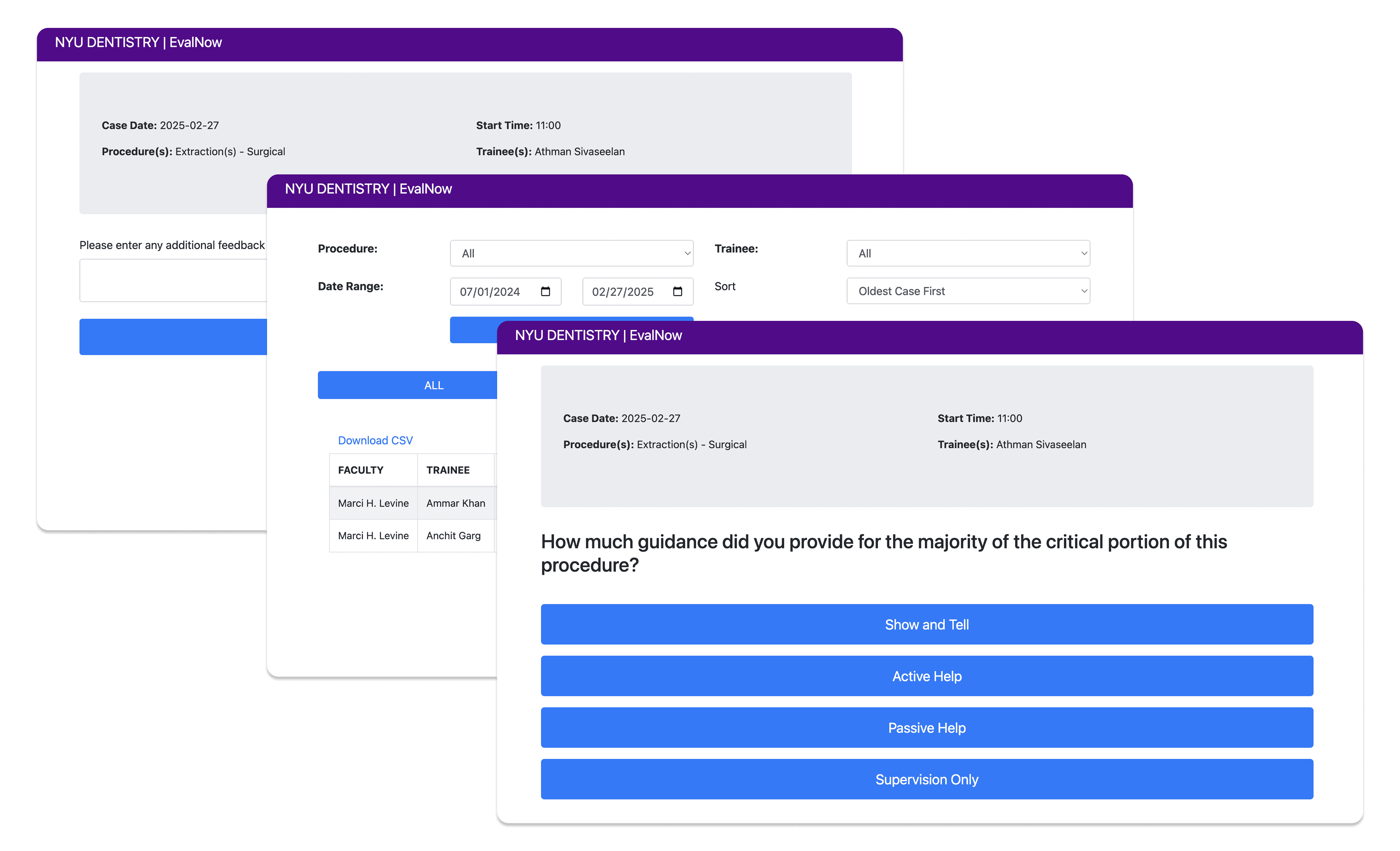
Why the Original Prototype Failed:
Faculty abandoned mid-session
Desktop-only
Never open when needed
No student view
No way to track progress
One-directional
No dialogue, no reflection
Core Problems Identified:
"No time for lengthy digital input"
"Past feedback is hard to find"
"I can't tell if I'm improving"
"Wide variation in how we evaluate"
Solution
Redesigning EvalNow from the ground up
A mobile-first feedback ecosystem built around how clinics actually work.
Design Principles:
Speed over completeness: Prioritize speed over completeness by designing each feedback interaction to be completed in under 60 seconds.
Mobile over desktop: Design for phone and tablet first, enabling feedback capture on the clinical floor—not at a desk after hours.
Capture over recall: Enable real-time voice and quick-tag capture so faculty don't rely on memory at the end of the day.
Dialogue over judgment: Structure feedback as a two-way conversation where students reflect first and faculty respond with context.
Core flows
01 FAST FEEDBACK WORKFLOW

45 seconds. That's all it takes.
Competency sliders, quick tags, and voice input. Auto-save for interruptions.
02 VOICE CAPTURE

If you can say it, you can save it.
Voice-to-text captures verbal feedback in real-time. Audio saved for tone.
03 BIDIRECTIONAL FEEDBACK

Feedback becomes a conversation.
Students self-reflect first. Faculty sees their thinking. Optional response loop.
04 AI TONE GUIDANCE

Supportive language, suggested—not forced.
AI suggests rephrasing when tone might be harsh. Faculty has final say.
Research
Every feature traces back to real user needs
To better understand user needs for both sides, we conducted surveys with 12 faculty members and in-depth interviews with 2 faculty members and 6 senior-year students.
The Reality of Clinical Feedback Today:
"Feedback is scattered across Axium entries, emails, verbal comments, and memory. Nothing connects." — Faculty Interview
"I get verbal feedback but forget it by the next patient. I wish I could record it somehow." — Student Interview
"If it adds time, we won't use it." — Faculty Interview (recurring theme)
FACULTY NEEDS
"I supervise several students at once—no time for lengthy digital input"
Fast, low-burden workflow
"I give feedback verbally in the moment but forget to enter it later"
Fits clinical timing
"If it adds time, we won't use it" (recurring theme)
Reduce work, not add it
"Wide variation in how colleagues evaluate similar work"
Consistent evaluation criteria
"Difficulty determining what to expect from 3rd- vs 4th-year student"
Clear learning objectives
Single source of truth
"I meet students for the first time and lack context on their skill development"
Student history visibility
"Prior systems are slow, require multiple logins, don't load well"
Reliable digital system
"Must infer skill level during the procedure"
Student preparedness info
STUDENT NEEDS
"Certain faculty perceived as unkind—students avoid working with them"
Safe, supportive interactions
"Feedback impacted by faculty fluctuations, inconsistent teaching styles"
Consistent expectations
"Intentionally schedule patients around preferred faculty"
Preferred faculty exists
"Pay little attention to numeric scores—practical suggestions far more valuable"
Clear next steps
"Requested features to track procedural progress more clearly"
Progress dashboard
"0-1-2 scoring not perceived as aligned with skill or growth"
Meaningful metrics
"Always on the run, often behind on patients"
Fast, low-disruption process
"Want to respond occasionally, not daily or weekly"
Bidirectional feedback loop
"Dread lengthy reflections but recognize their value"
Low-burden reflection
Design Decisions
Why redesign from scratch?
The early prototype had fundamental flaws: desktop-only architecture, no student view, one-directional flow. Research showed iterating would perpetuate bad assumptions. We kept insights but rebuilt the system.
Why mobile-first?
Because faculty move frequently, rely on verbal feedback, and existing systems are slow and fragmented, the system was designed as a mobile-first experience that enables instant, in-the-moment access.
Why student reflection first?
Because one-way feedback feels judgmental and faculty want visibility without added grading work, the flow prioritizes student reflection first, followed by optional faculty responses.
Why voice input?
Because faculty prefer verbal feedback for nuance and typing feels disruptive during care, the system supports hands-free voice input while preserving tone through saved audio and transcripts.
Why AI suggestions not rewrites?
Because faculty want support without losing authorship, AI provides optional suggestions while leaving final decisions fully in the hands of faculty.
Design Process - User flows
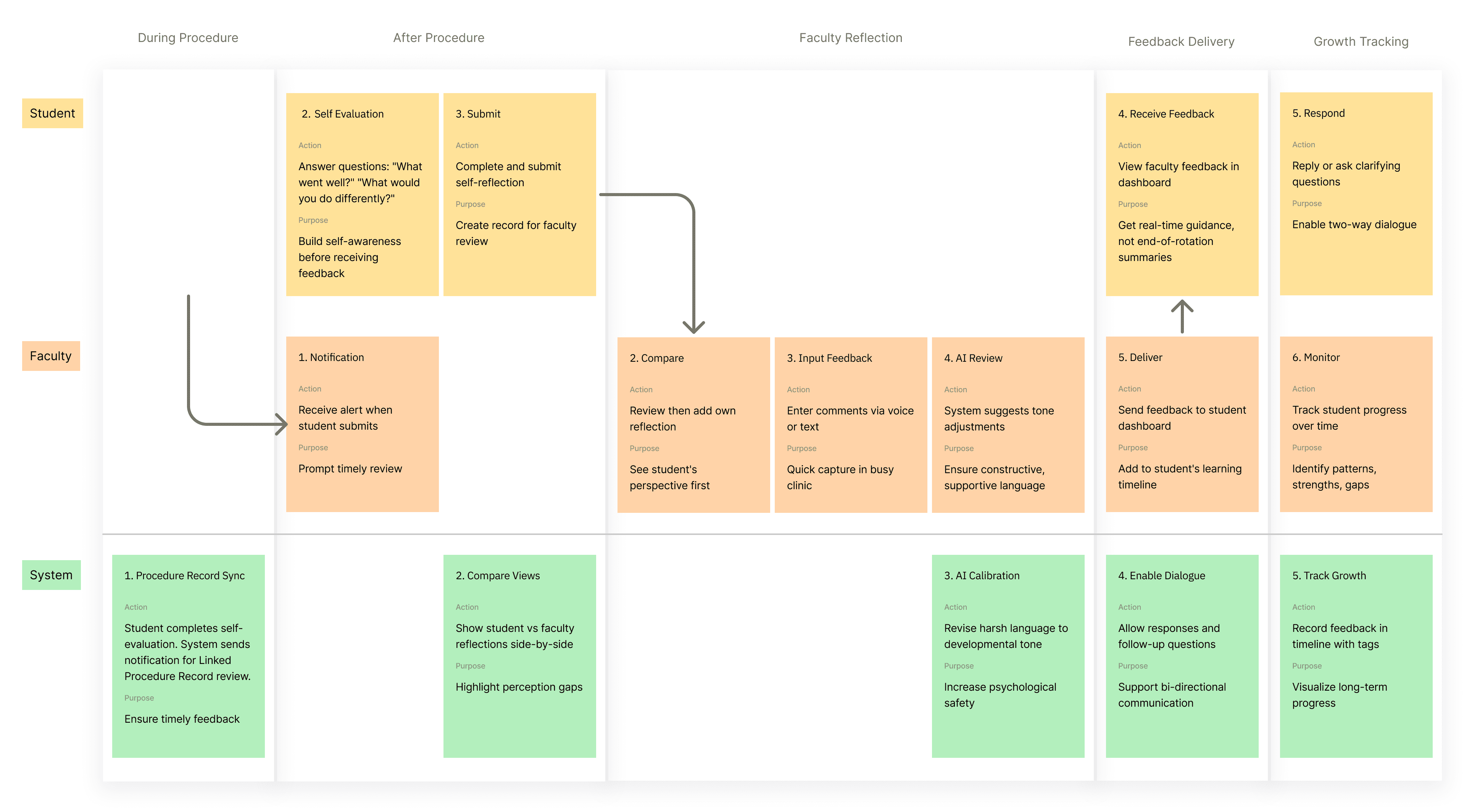
How students, faculty, and the system work together
EvalNow transforms feedback from a one-time event into a continuous loop. Students self-reflect before receiving feedback, faculty review with full context, and the system ensures psychological safety through AI calibration—all while tracking long-term growth.
User Testing & Iteration
Validating our redesign with real users
We tested the interactive prototype with 5 faculty members and 4 students through moderated remote sessions conducted via Google Meet. The goal was to validate whether the redesigned flow reduced friction while maintaining clarity and emotional safety.
User Testing Insights & Design Responses
Dashboard clarity
Users felt the dashboard lacked clear guidance and were unsure where to begin.
→ We introduced step-by-step prompts and color-coded status cards to establish hierarchy and guide progression.
Voice interaction
The voice input button was difficult to tap while moving.
→ The button size was increased to 48px to support one-handed use in motion.
AI suggestions
Some users felt the system’s language implied evaluation or judgment.
→ AI feedback was reframed as “Suggestions available” to reduce perceived pressure.
Student visibility
Students were unsure whether faculty had reviewed their reflections.
→ A “Viewed by faculty” indicator was added to provide transparency and reassurance.
Before / After:
Metric
Task completion
62%
94%
Feedback time
4.2 min
52 sec
Emotional comfort
3.1/5
4.4/5
Would use daily
2/9
7/9
Looking back
What I learned from EvalNow.
Sometimes start over
Early prototype had fundamental flaws. Research gave permission to redesign from scratch.
Emotional safety is UX
Students avoiding faculty is a design problem, not just interpersonal.
Bidirectional > One-directional
Feedback as dialogue creates learning. Feedback as judgment creates avoidance.
Next steps
1. Conduct semester-long pilot study
Run a semester-long pilot with faculty and students to evaluate real-world adoption, measure time-to-feedback, and identify workflow breakdowns that only surface through sustained use.
Design iPad-optimized layouts
Explore iPad-optimized layouts for shared clinical use, as NYU Dentistry is currently considering allocating funding to support the purchase of communal iPads. This would enable on-the-floor documentation without relying on personal devices and inform hardware-aware interface decisions.