Interspace / AI-Human Collaborative Platform + ITP Thesis
AI as a creative partner, not a vending machine.
Tested with 400+ visitors at the Korean National Science Museum. Now my ITP thesis, graduating May 2026.
I designed and built Interspace from scratch—a collaborative drawing platform where AI doesn't finish your ideas, it keeps them unfinished. Not just the UX, but the full-stack: real-time canvas, dual AI pipelines, edge functions. Design thinking meets vibe coding.
Role
Product Designer & Creative Technologist
Duration
Sep 2025 – May 2026 | NYU ITP Thesis
Skills
Concept & Research
Dual-System Design
Full-Stack Development
AI Pipeline Architecture
Overview
I built the AI creative tool I wished existed.
Every AI drawing tool I tested worked the same way: prompt, wait, output, repeat. Efficient — but that efficiency is exactly what kills exploration. Users get a polished result, stop asking questions, and iteration dies at the first output.
I watched this happen firsthand. When I tested my first prototype at the Korean National Science Museum with 400 visitors, people arrived with strong mental images and the AI just mirrored them back. No counterweight. No surprise. No reason to keep going.
Interspace is a collaborative drawing platform where you draw on one screen while AI responds on another. No prompts. No waiting. Just real-time co-creation — two systems designed to keep the creative conversation open, not close it with a finished image.
I designed and built the full stack from scratch: real-time canvas, dual AI pipelines, edge functions. Design thinking meets vibe coding.
The problem
Generative AI tools produce finished images on demand.
That's exactly what ends exploration. Users get a polished result, stop asking questions, and iteration dies at the first output.
Users don't need AI to finish their ideas. They need AI to expand what they haven't imagined yet.
The solution
Two voices, one dialogue: Echo + Imagine.
Target users: Early-stage ideators — illustrators, designers, and visual thinkers who sketch to discover, not to execute. They're not looking for a finished image. They're looking for the next thread to pull.
system
Role
Output
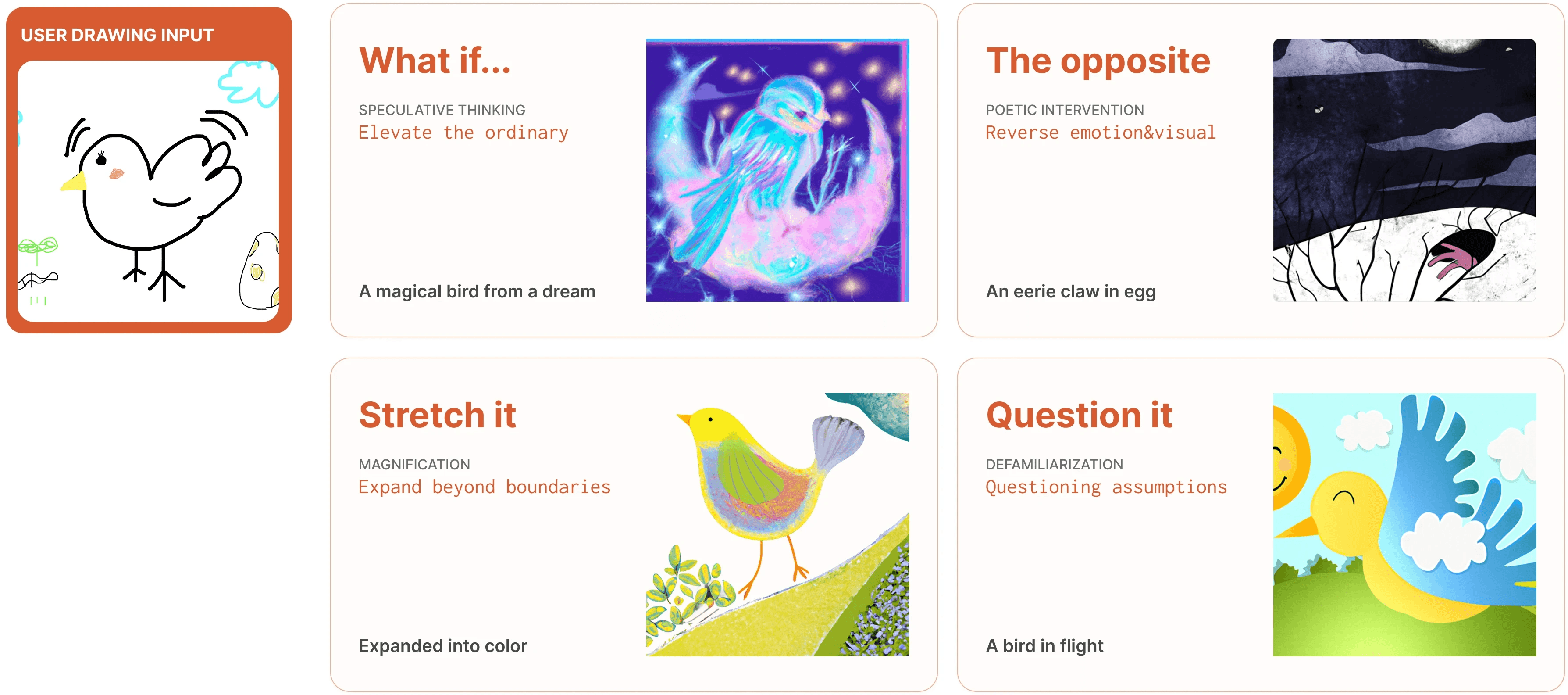
Four provocation modes
Background
Where this came from. At ITP, almost every project was a team of strong-minded artists, and the friction of clashing perspectives is what pushed my work somewhere I couldn't reach alone. Interspace started as a question: could someone drawing completely alone get that same expansion, with AI as the teammate?
And the shape of that expansion comes from my ceramics background. The most meaningful creative moments come from unexpected responses, when clay cracks in the kiln or a glaze runs somewhere you didn't plan. Those accidents become invitations to reinterpret. I wanted AI to play that role.
Exploration
Generative AI tools produce finished images on demand.
That's exactly what ends exploration. The efficiency of prompt-based tools is also their ceiling.
My hypothesis: drawings grow through dialogue.
When a friend looks at your sketch and says "I see this here," that outside perspective is often where the next idea comes from. I wanted AI to play that role.
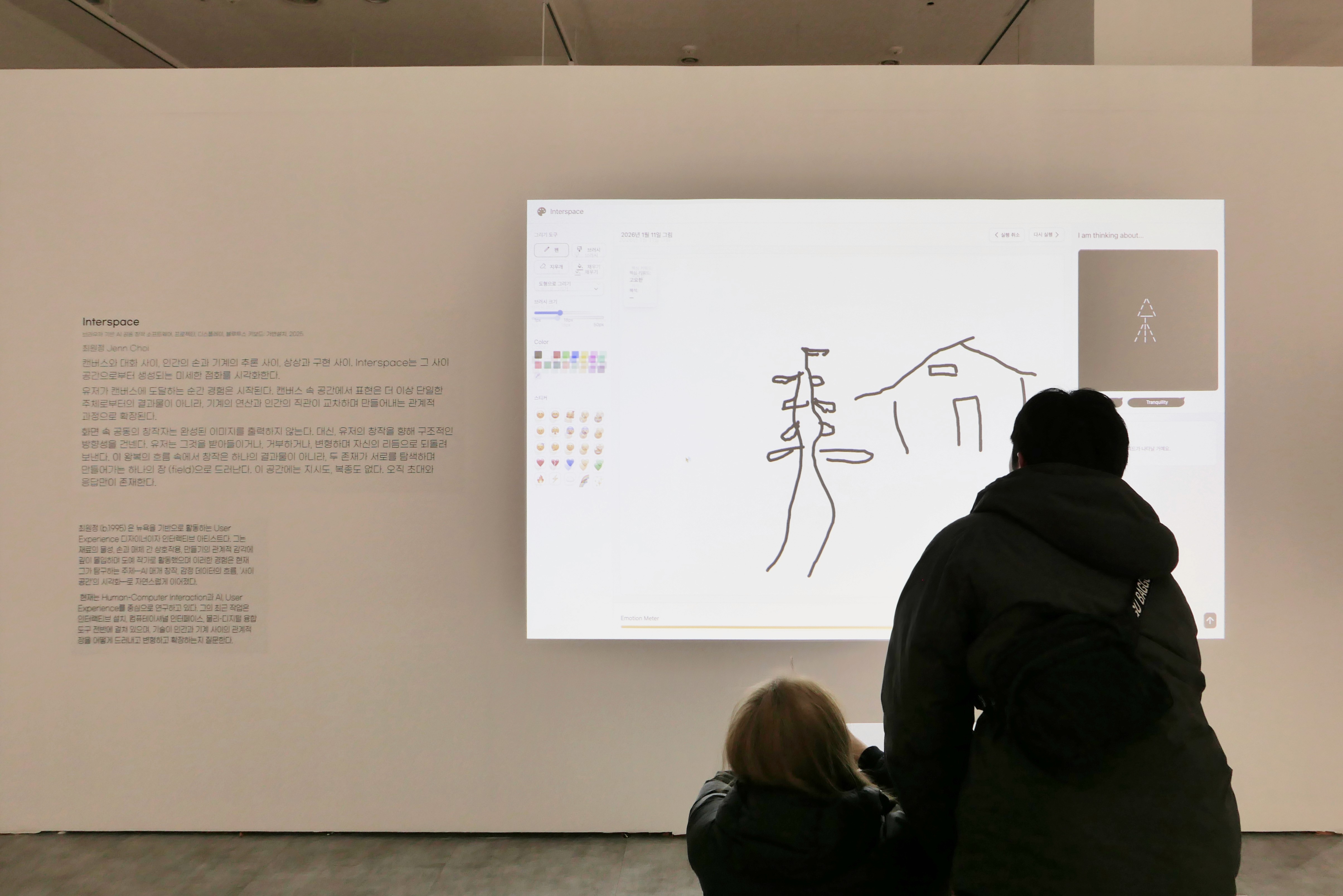
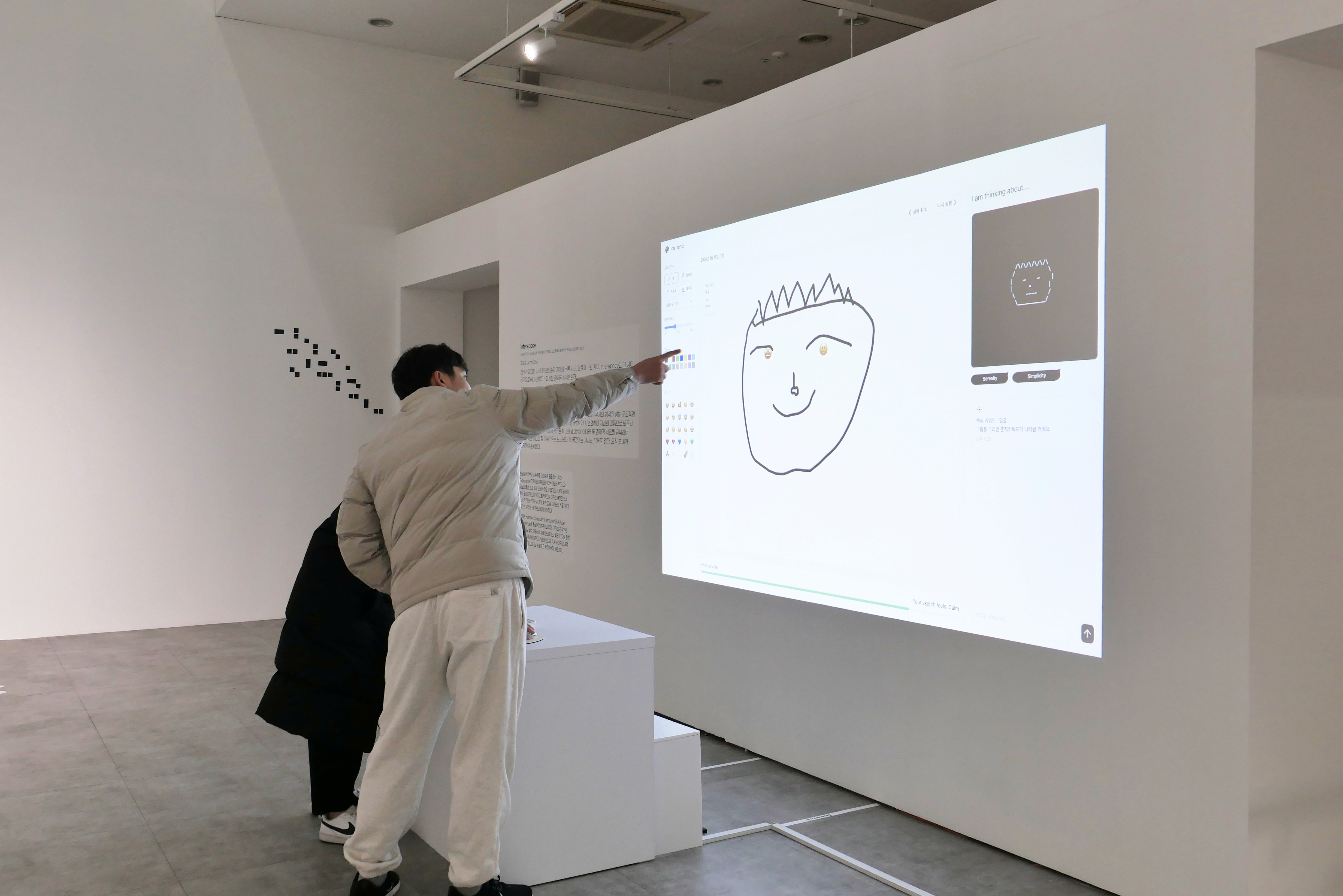
V1 reflected the drawing in two parallel formats — ASCII art and keyword text — letting AI speak in its native perceptual language. This is how the machine sees your drawing.
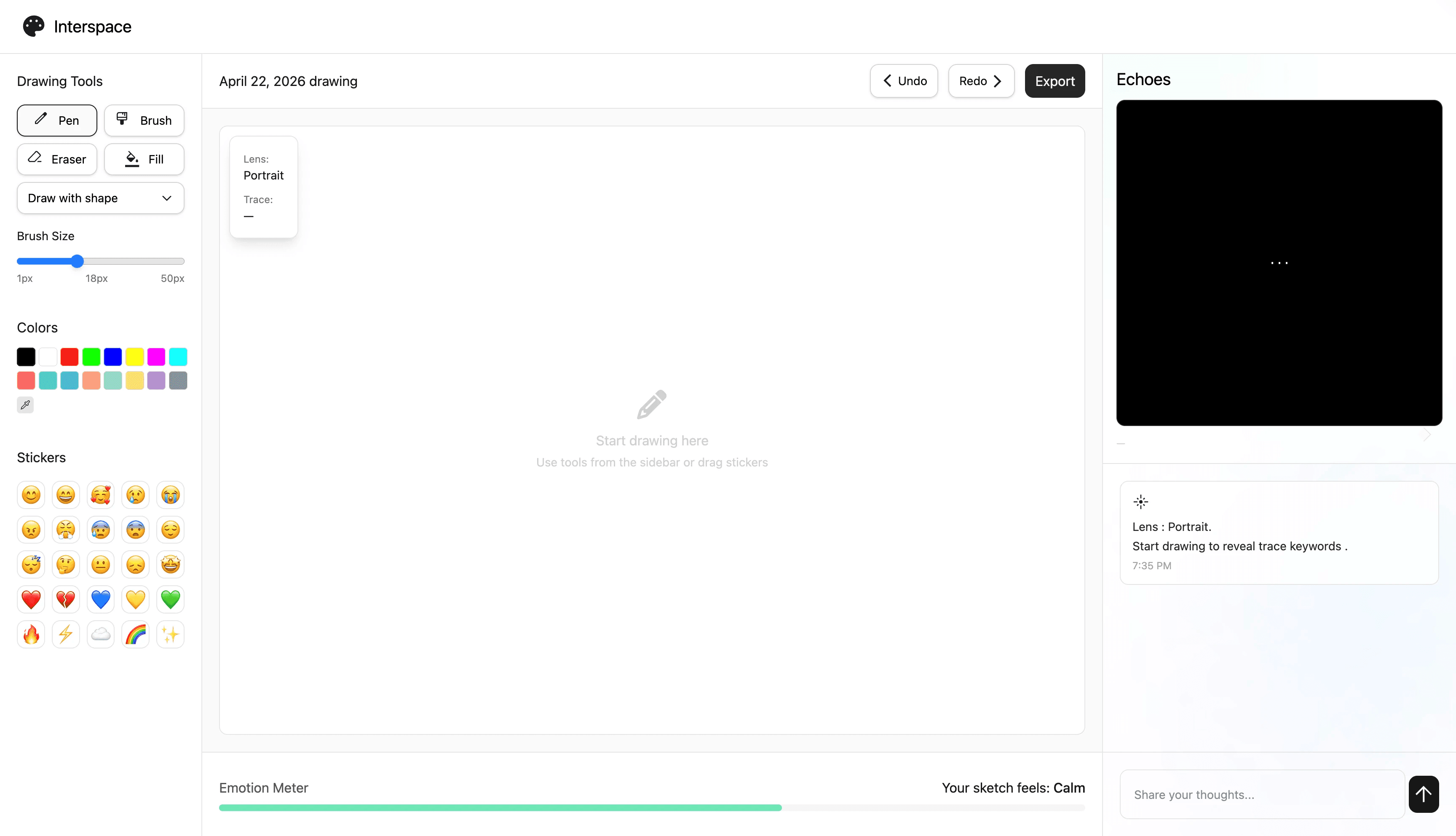
Ver 1.
People know what they want to draw. What they don't know is what else they could draw.
I tested V1 at the Korean National Science Museum. 3-400 visitors, 10 interviews. Users arrived with strong mental images. Reflection, in any format, just mirrored what they already had. No counterweight. No surprise.
Design Process
V1
Reflection as dialogue
ASCII art + keywords — letting AI mirror your drawing in its own language.
Users arrived with strong mental images. The AI just confirmed them.
Reflection alone can only mirror.
V2
Two voices, one canvas
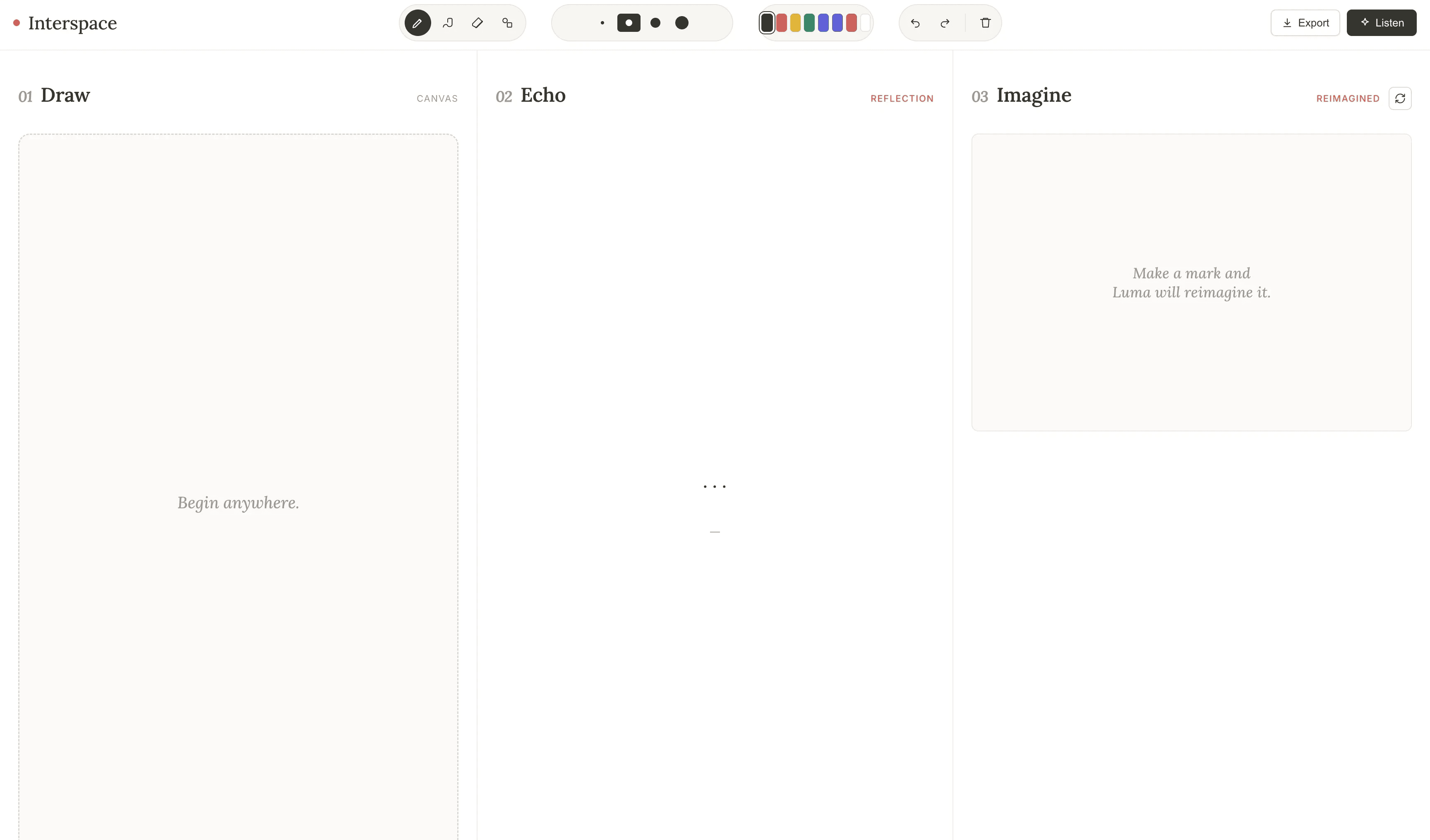
Echo reflects. Imagine reimagines. Three equal panels: Draw → Echo → Imagine.
Two voices worked — but equal panels cramped the drawing, and users couldn't steer the provocation.
Dialogue needs direction, not just voices.
V3
Drawing as the center of gravity
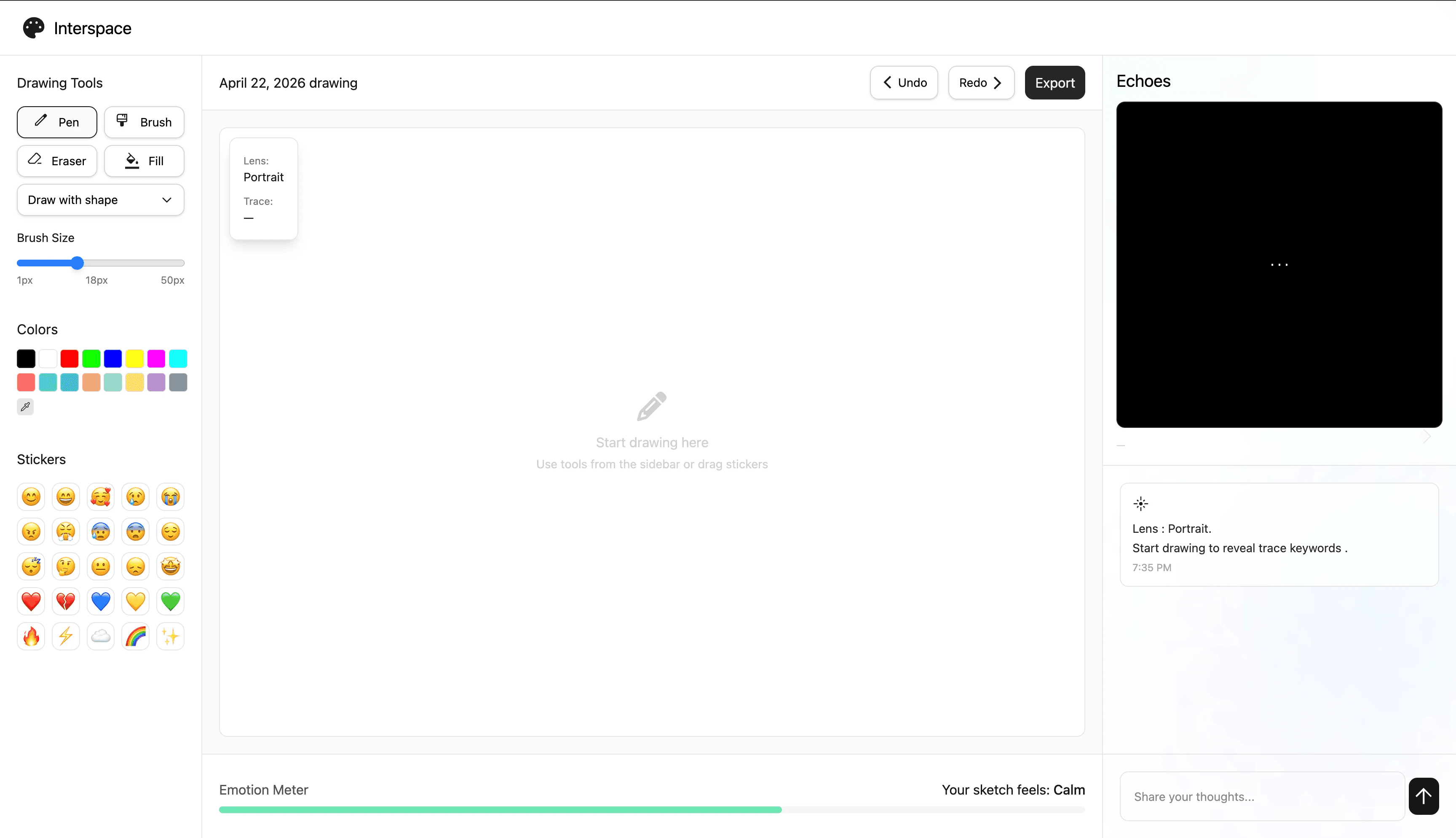
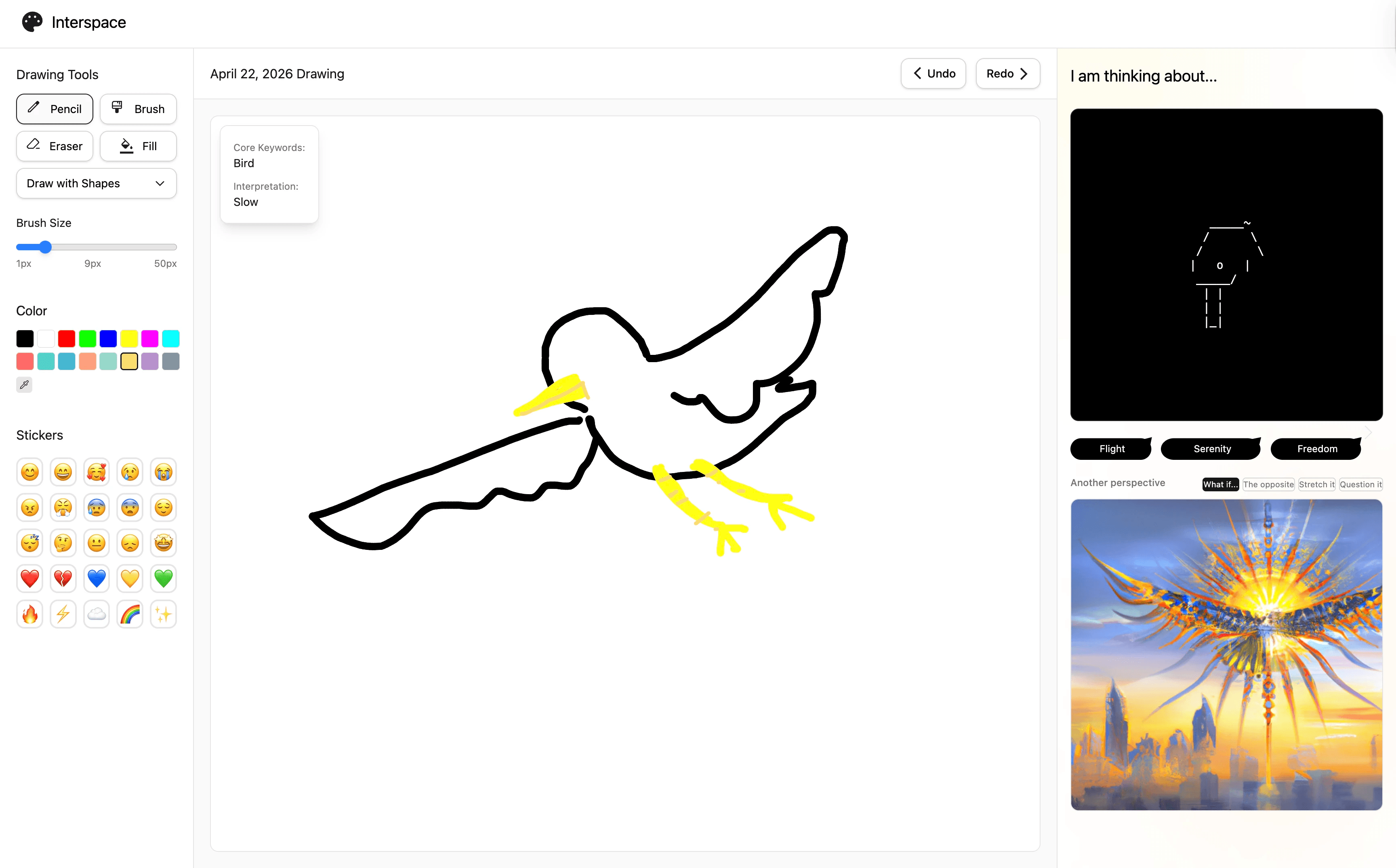
Canvas expands. Echo reads intent, not just pixels. Imagine gives you four modes to steer.
User felt inspired by extended images, and got interested to think deeper.
Creative partnership is being challenged on your own terms.
Design Decisions
Reflection, provocation, and the space to create.
1. Drawing as the center of gravity. V2's three equal panels made drawing compete with AI. V3 gave the canvas the largest space—Echo and Imagine moved to the side. One act, accompanied.
2. Echo reads you, not just your drawing. Mirroring strokes wasn't enough. Echo now combines your pre-selected keyword (Dog) with your drawing tempo (Slow)—interpreting intent and behavior, not pixels.
3. You steer the provocation. V2's Imagine offered one reimagining, take it or leave it. V3 gives users four modes to direct the dialogue: What if / The opposite / Stretch it / Question it.
Unfinished by design. Echo responds in ASCII — raw, abstract, deliberately incomplete. Imagine generates images, but never as a final answer. Neither system tries to finish user's idea. They keep users in the conversation.
Technical Architecture
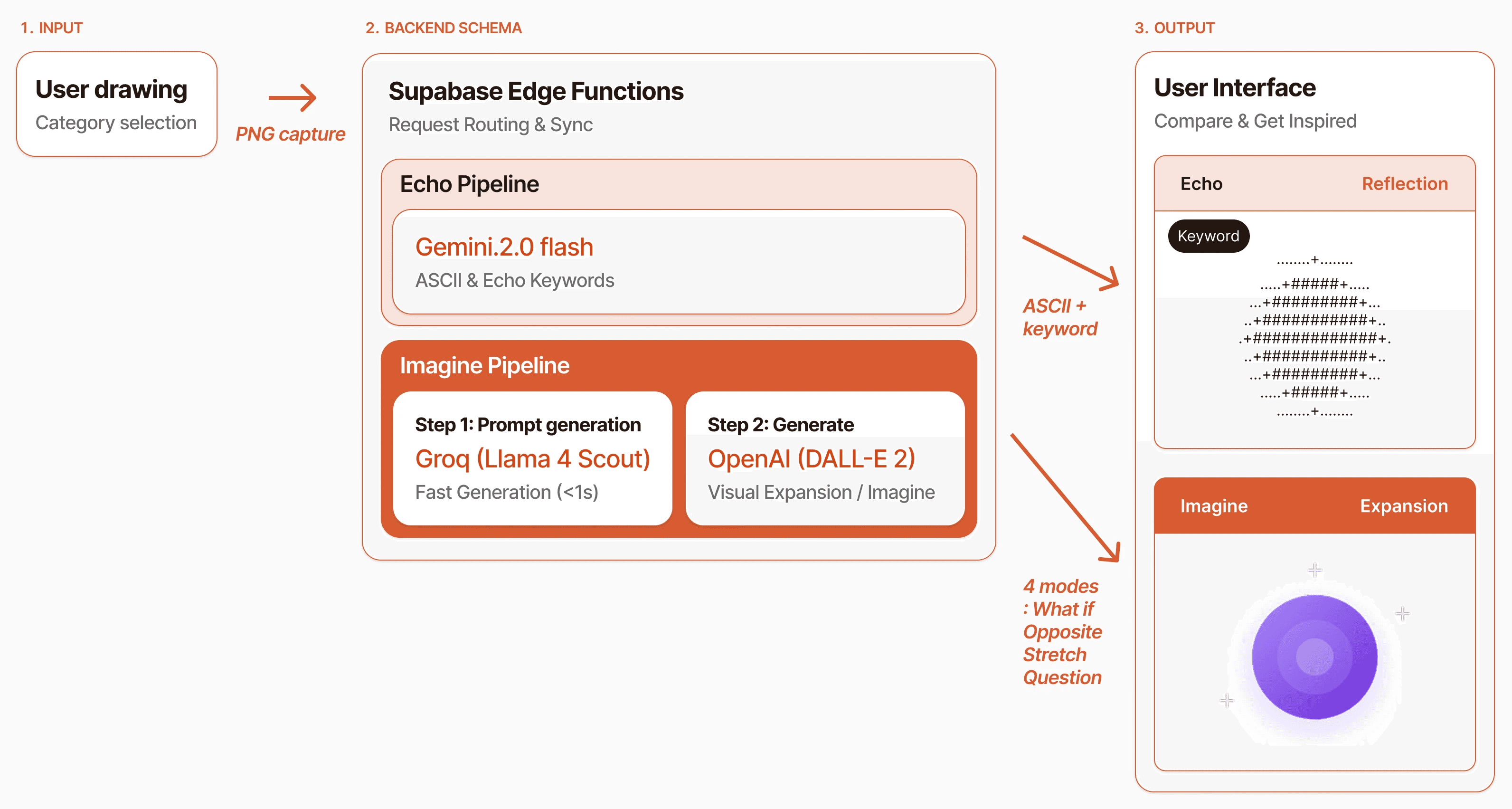
Stack
Frontend: Vite + TypeScript + React (real-time drawing canvas)
Backend: Supabase Edge Functions (streaming, state sync, schema)
AI Pipelines: Groq (Llama 4 Scout) for Echo · Replicate for Imagine
Build tools: Claude Code, Cursor
Key architecture decisions
1. Dual pipelines, not one model with two prompts. Echo and Imagine had different latency profiles—Echo needed to feel instant, Imagine could take longer. Separating them let me optimize each for its role.
2. Edge functions over traditional backend. Streaming responses had to feel like drawing alongside someone, not waiting for a server. Edge functions kept the loop tight enough to preserve the simultaneous experience the design depended on.
3. Mid-project stack migration. Originally built on OpenAI + Replicate. Switched Echo to Groq + Llama 4 Scout mid-project to cut API costs dramatically without losing quality. The call required weighing both the business constraint (sustainable hosting past thesis) and the interaction quality trade-off.
BUILDING AS A DESIGNER
What it cost, what it taught.
Building this myself wasn't smooth. That's the point.
Debugging across three systems. A failing response could be a frontend state bug, an edge function timeout, or an API rate limit. Learning to read logs across Supabase, Replicate, and the browser console became its own skill.
Documentation fluency. Each API (OpenAI, Replicate, Groq, Supabase) has its own docs patterns. Time-to-first-success varied wildly. This is the exact friction I'd later recognize as a DevEx problem—and it shaped how I think about designing for developers now.
Typing the unknown. TypeScript surfaced a class of bugs I would have shipped without it—shape mismatches between what Replicate returned and what my UI expected.
Knowing when to migrate vs. patch. The Groq migration wasn't planned—it was forced by cost. Making that call with no engineer safety net was the most "product lead" moment of the project.